Qt QListView Tutorial
Qt QListView Tutorial
In my last article, I am write about toturial how to use QTableView. In this tutorial, I am try to write about Qt QListView Tutorial. The QListView class provides a list or icon view onto a model. That is like with QTableView. QListView support only one column (if you get a method how to create multiple column with QListView, maybe you can let me know 🙂 ). So, if you want to create mutliple column, you can use QTreeView or QTableView than QListView.
Below is a basic sample code how to use QListView (Qt QListView Tutorial). This code create a QListView, fill QListView with data, and show QListView program. From this Qt QListView Tutorial, you can extend to your program to more complex. Create a file, save with “listviewexample.cpp“, copy this text :
#include "listviewexample.h"

ListViewExample::ListViewExample( QWidget *parent)
    : QWidget( parent )
{
    /*set number of row and column, listview only support 1 column */
    nrow = 4;
    ncol = 1;

    /*create QListView */
    m_listView = new QListView(this);
    QStandardItemModel *model = new QStandardItemModel( nrow, 1, this );

    //fill model value
    for( int r=0; r<nrow; r++ )
    {
            QString sstr = "[ " + QString::number(r) + " ]";
            QStandardItem *item = new QStandardItem(QString("Idx ") + sstr);
            model->setItem(r, 0, item);
    }

    //set model
    m_listView->setModel(model);
}

int main( int argc, char **argv )
{
        QApplication a( argc, argv );

        ListViewExample lve;
        lve.show();

        return a.exec();
}
We can fill QListView item with QStandardItemModel class. This is header file for this Qt QListView Tutorial. Saving this text to “listviewexample.h” :
#ifndef LISTVIEWEXAMPLE_H
#define LISTVIEWEXAMPLE_H

#include <QListView>
#include <QStandardItemModel>
#include <QApplication>

class ListViewExample : public QWidget
{
	Q_OBJECT

public:
        ListViewExample( QWidget *parent=0);

private slots:

private:
        int nrow, ncol;
        QListView *m_listView;
};

#endif
Create a “listview.pro” file for this Qt QListView Tutorial and fill with this text :
TEMPLATE = app
INCLUDEPATH += .

# Input
HEADERS += listviewexample.h
SOURCES += listviewexample.cpp
Compile this Qt QListView Tutorial with command “qmake” and “make“. This is output from this Qt QListView Tutorial :
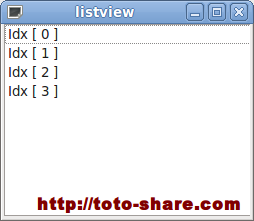
This is a basic tutorial how to use QListView (Qt QListView Tutorial), please let me know if you have a question. You can get the complete code Qt QListView Tutorial at here.
Source : http://www.digitalfanatics.org/projects/qt_tutorial/chapter13.html

I don’t think the title of your article matches the content lol. Just kidding, mainly because I had some doubts after reading the article.
Fast deposits and even faster withdrawals. That is all I really care about and this site delivers. br6733aa is my new go-to site.
Feeling lucky today and this app is the perfect place to test my streak. The graphics are top notch. Visit pkluckygameapk now.
[311]bt222 Official Login | Legit Online Slots at Mabilis na Cash Out,Gamitin ang bt222 official login para sa legit online slots ph. I-download ang app at alamin kung paano maglaro ng baccarat. Mag-sign up na para sa mabilis na cash out! visit: bt222
Thank you for your sharing. I am worried that I lack creative ideas. It is your article that makes me full of hope. Thank you. But, I have a question, can you help me? https://accounts.binance.bh/es-MX/register-person?ref=A00OPRX4
Feeling like a real boss with the wins I’ve been getting here. The platform is secure and the gaming environment is just fantastic. Join the fun at jilibosslogin.
Your article helped me a lot, is there any more related content? Thanks! https://accounts.binance.bh/register/person?ref=IXBIAFVY
Super easy setup and the game graphics are stunning. It is definitely the most stable version I have used. Check ck9999appdownloadapk!
The tutorial’s use of QStandardItemModel with QListView is a clean starting point, but it doesn’t address the performance cost of creating a separate QStandardItem for every row—fine for small lists, but a custom QAbstractItemModel is usually better once the data grows. A short note on when to make that switch would round out the example. https://theaiimageagent.com/