April 5, 2012
Incoming and Outgoing Mail Server Settings Yahoo Mail From Google Mail
Incoming and Outgoing Mail Server Settings Yahoo Mail From Google Mail
I have email in Yahoo and Google. This is a tutorial how we can accepting incoming and outgoing from gmail to our Yahoo mail.
- Open your yahoo mail.
- Click Options menu
- Add gmail account. Change POP server address to : pop.gmail.com and Override default POP port to 995.
Please check this picture to more explanation :
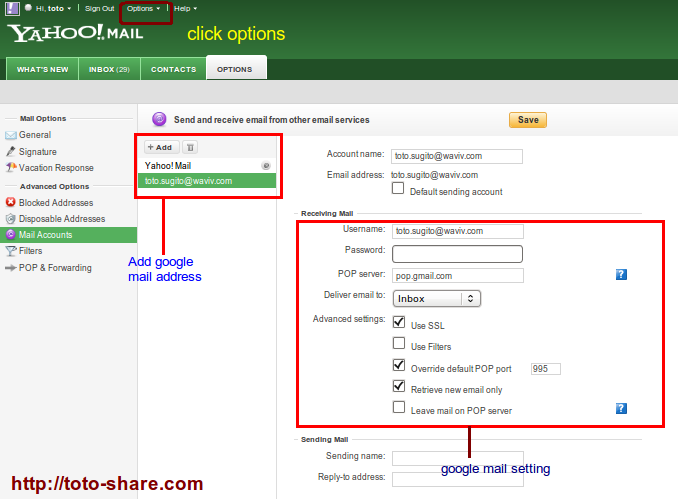
After you success with this setting, open your gmail email. You will get email confirmation of this setting. Open link in your gmail to accepting sharing your incoming and outgoing email from gmail shared to yahoo.com
Source :
http://www.emailaddressmanager.com/tips/mail-settings.html

Error when trying to access XAMPP from a network
Isi Ulang Internet AHA