April 28, 2016
Android show alert window with button
I am learn about android programming in my free time. I am planned to create a simple alert window with a button. We can use AlertDialog class to create android alert window in Android. The sample output using this class as like picture below.
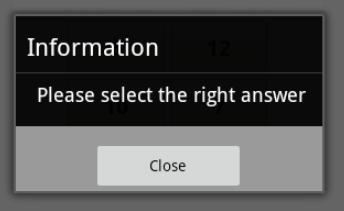 I have created a simple function how to create Android alert window using AlertDialog class. Please check this subroutine :
private void showAlertOk(String strtitle, String strtext, String strbutton)
{
	AlertDialog.Builder builder = new AlertDialog.Builder(formQuestions.this);
	builder.setTitle(strtitle);
	builder.setMessage(strtext);
	builder.setPositiveButton(strbutton, new DialogInterface.OnClickListener()
	{
		public void onClick(DialogInterface dialog, int which)
		{
			//add our code in here
		}
	});
	builder.show();
}
We can give parameter to this Android alert window subroutine to give same result like picture above using command :
showAlertOk("Information", "Please select the right answer", "Close")
I hope this simple subroutine can give you more explaining about how to create alert window in Android.

Java JFrame change Icon
Button Android text automatic forced to All Caps
Java Prevent BoxLayout From Expanding Children
4 Comments
Can you be more specific about the content of your article? After reading it, I still have some doubts. Hope you can help me.
I have been exploring different betting platforms for quite some time and finally found my go to spot. The interface is smooth and customer support is always ready to help. Everything runs without a hitch and withdrawals are surprisingly quick. Highly recommend giving it a shot if you want a reliable experience. 346betlogin
Found this while searching for a solid gaming spot in Mexico. The registration process is straightforward and I got my first bonus without any hassle. Slots run smoothly on mobile and I never had a single lag issue during my sessions. Definitely staying with this platform. calientwmx
Been using this for my weekend cash games and the wallet system makes depositing so much easier. No endless redirects or confusing steps just a clean setup that works right away. The live dealer tables are running smoothly and the chats with other players add a nice local touch. Give it a shot if you want stress free gaming. apatuwalletlogin